A man walks into a kitchen. Grabs an empty glass. Goes to the tap. Fills it. Drinks.
No dialogue, no stunts, no special effects. Just fifteen seconds.
That was the whole brief. As I told the AI assistant I was working with: “All I wanted was a very simple thing.”
AI has got very good at text. As I put it during the project: “We can now generate amazing articles, amazing copies, amazing code with AI. But generating images and videos is still a problem.” A single generated image is often great. I’ve had wonderful experiences with one-off image generation.
Video is where it falls apart. Over more than a day of work, two video models and a stack of image revisions, I didn’t get one usable clip of a man drinking water. This post is about why, and about the evidence that it isn’t just me. I’m not claiming it can’t be done. My claim is narrower. Today’s video models make beautiful frames. What they still struggle with is turning a simple story into a consistent sequence of physical actions. And a simple prompt won’t get you there.
All faces in the images below are blurred. The man in them is an AI-generated version of me.
The job hiding behind a 15-second clip
Video is a stack of jobs. You write the story. You design the set, the props, the character and every action. A common way to get control is to generate still images of the key moments first, then ask a video model to animate between them, using one image as the first frame and another as the last. Every layer can introduce an error, and every layer after it inherits that error.
I spent most of my notes during the project on one problem, the door. Plenty of other failures went past without a comment from me at the time. Going back through the footage, the failures fall into five groups.
1. It can’t keep the same person, or the same room
My first note on the first set of stills was blunt: “the faces are not consistent.” By the assistant’s own account, even after it switched to using only my photo as the face reference, the faces still varied between angles.
The room didn’t hold either. In the first video, made with Google’s Omni 1.1 Flash model in its Flow tool, the camera was supposed to cut from the hallway into the kitchen. Instead the two places were blended together. For about a second, the hallway, the kitchen, the door and the man are all layered on top of each other and see-through.
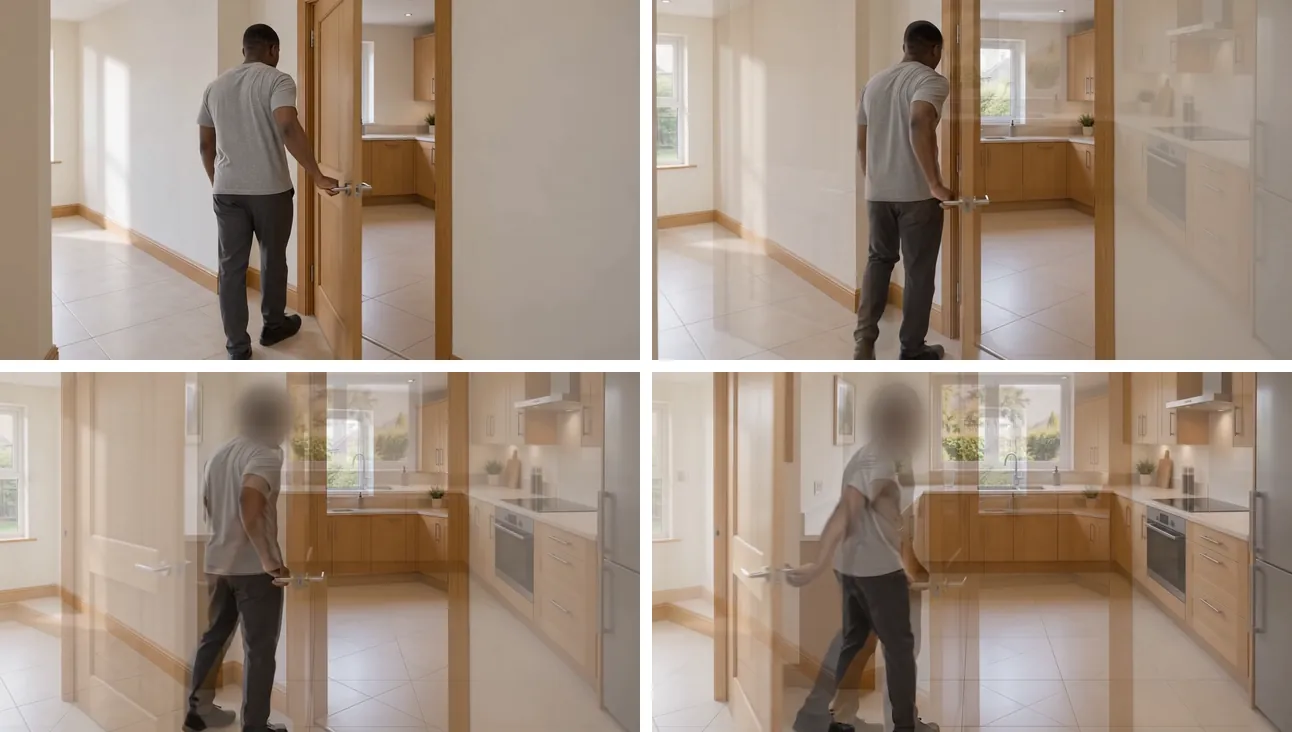
The second model I tried, xAI’s Grok video model (version 1.5, run through Higgsfield), produced one 15-second clip set in what is meant to be one kitchen. It shows three. The wide shot has plain walls and a garden window. The sink close-up has white tiles, a textured glass window and a wall socket that weren’t there a second earlier. The closing close-up adds a paper-towel holder and a toaster. And the face, the one thing a viewer looks at most, was in my words “terribly wrong”. In the closing close-up it has deep creases across the forehead and bulging eyes that don’t belong to the person in the earlier shots. With faces blurred for this post you’ll have to take my word for that one.
This is the most widely reported problem in AI video. Adam Regan argues that realism is a single-frame problem, which AI handles well, while consistency is a problem between frames and between shots, which it doesn’t. His example is almost mine: if a kitchen’s window is on the left in shot three, it can’t move to the right in shot seven. Filmmaker Austin Zartman, quoted by Leyline, says “maintaining visual consistency” is still very difficult. Google’s own model card for Gemini Omni Flash lists “maintaining complete consistency throughout edits” and “generating scenes with complex motion” among its known limitations.
2. It doesn’t know where things are
The glass was the second thing I flagged: “there is no clear position where the glass was picked from. It is weird that he is holding the glass right next to the door instead of somewhere closer to the kitchen top or faucet.”
Pinning the glass beside the sink created a new contradiction. He picked the glass up right next to the tap, and in the next shot he was walking towards that same tap from the far side of the room. As I put it: “you can’t tell me someone picked a cup close to the faucet, but then to get water from the faucet, they are now moving from a farther position in the room.” The stills I gave Google Flow as start and end frames already had this contradiction, and the video carried it straight through.
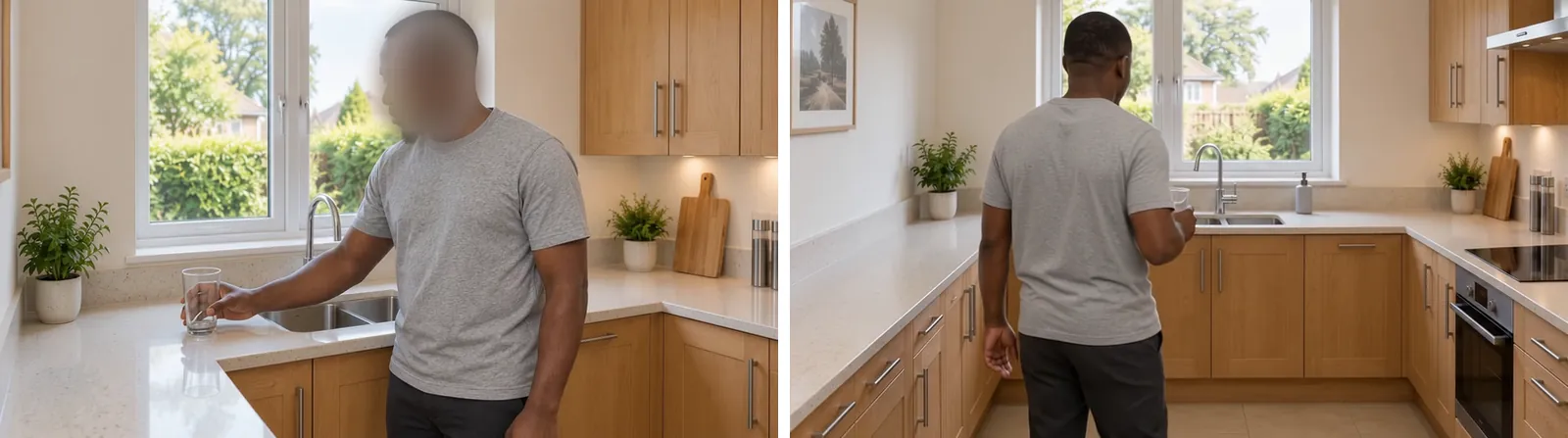
Each shot looks fine on its own. Together they describe a walk that makes no sense. A film crew employs a script supervisor whose whole job, as Regan puts it, is tracking “which hand held the cigarette, how full the glass was”.
There’s no script supervisor in AI generation. Research backs this up. OSCBench, presented at ACL 2026, tested six video models on actions that change an object, like peeling or slicing. It found that they “consistently struggle with accurate and temporally consistent object state changes”, even while matching the general scene well. A glass going from empty to full is exactly that kind of change.
3. It doesn’t understand how things work
A door has a hinge side and a handle side, and they don’t swap because the camera moved. The images kept swapping them. I ended up explaining doors: “If the door is opened with the handle on the right from the outside, when you are inside, the handle of the door should then be on your left if you are facing the door.” And later: “The door opens to the wrong side and so does the handle too. He is coming in from the left so the door should open to the right.”
In the first video he opened the door with his right hand, as the input stills did. Afterwards I asked for the left, so he could walk in and turn naturally. In the next set of stills the left-hand grip was right, but he was standing far too close to the door. In my words, “his standing position doesn’t make sense to the door.” By the assistant’s own account, every attempt to move him back switched the grip to the right hand again.
The tap was no better. In the Grok clip, his hand passes the tap as he reaches for the glass, and I wasn’t sure he had touched it at all. The frames don’t settle it. What they do show is the water starting to run while both of his hands are holding the glass, with the tap’s lever untouched beside him.
That is the kind of failure MechVerse, a 2026 study from Purdue University, measures in mechanical parts. It found that video models “can preserve appearance and smoothness while failing to generate mechanically admissible motion”. It describes failures such as parts rotating when they should slide and connected parts falling out of step, and the errors grow as more parts are linked. A door handle on the wrong side. A tap that runs by itself. Those are the household versions.
4. It doesn’t understand water
Then the water itself. In the Grok clip, while he holds the glass under the tap, water runs straight out of the bottom of the glass into the sink, as if the glass had no base.
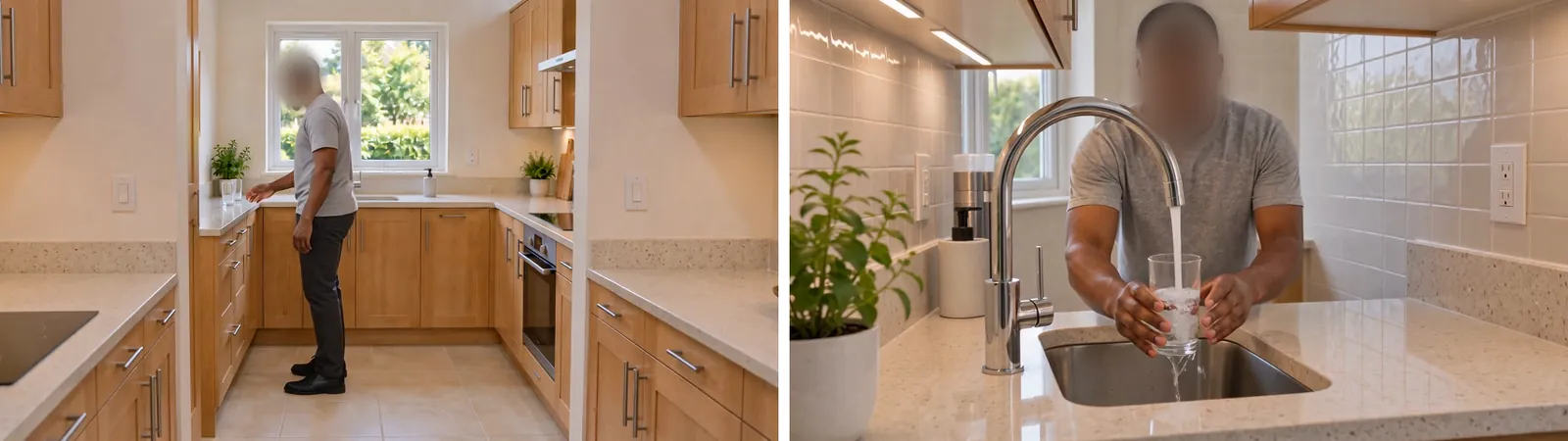
This kind of gap has been measured. Google DeepMind researchers built a benchmark called Physics-IQ to test whether video models understand physical principles across solid mechanics, fluids, optics and more. Fluids were actually one of the easier categories. Across the models they tested, physical understanding was “severely limited”, and the best model scored 29.5 out of 100. More importantly, how real a video looked had no relationship to how physically correct it was (paper, WACV 2026). VideoPhy uses almost my exact scene as an example of physical common sense: water pouring into a glass should make the level rise. Human reviewers found that even its best-scoring model got both the prompt and the physics right in well under half of cases. Both studies tested models that are a generation or two old, and newer ones may do better. But the pattern they describe is the one I got from 2026 models. The picture looks right. The physics is wrong.
5. It doesn’t pay attention
When you fill a glass, you watch the water. In the still images I flagged that he wasn’t: “If someone is filling water or getting water, they should be looking at the action they are taking. Most times action requires awareness, which in this case, the actor lacks awareness.”
The Google Flow video has the same problem. In the last moments of the filling clip, with the water still pouring, he turns his head away from the glass towards the camera.
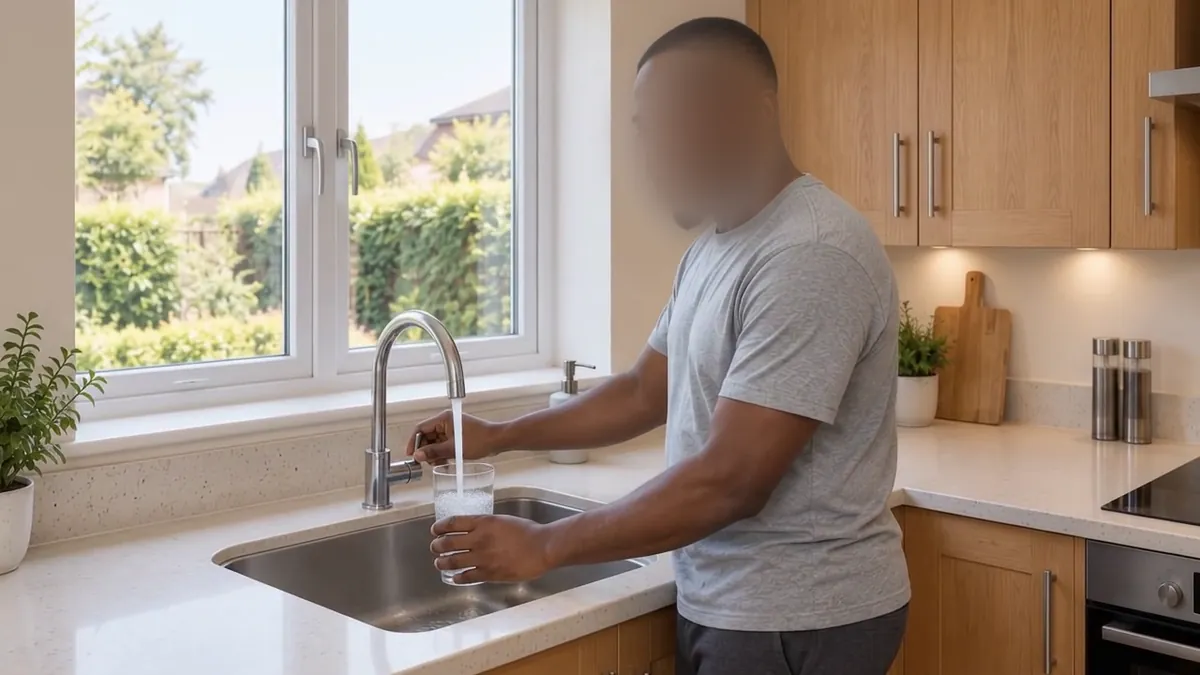
It wasn’t all wrong. The final still of him sipping while looking straight into the camera was exactly right, and I called it “fantastic”. That is what makes the rest frustrating. The models can produce a great single moment, but not a person who keeps paying attention to what their hands are doing from one shot to the next. I couldn’t find a study that measures this one directly. It’s the failure I’d most like to see someone test.
And the AI checking the work missed things too
The assistant I worked with could see every image. It had image input, and by its own account it used it. I still kept finding the errors first. When I spotted a deformed hand in the door image intended as the start frame for the next video, I wrote: “crazy how you have vision capabilities and I am the one finding the errors in image generation.”
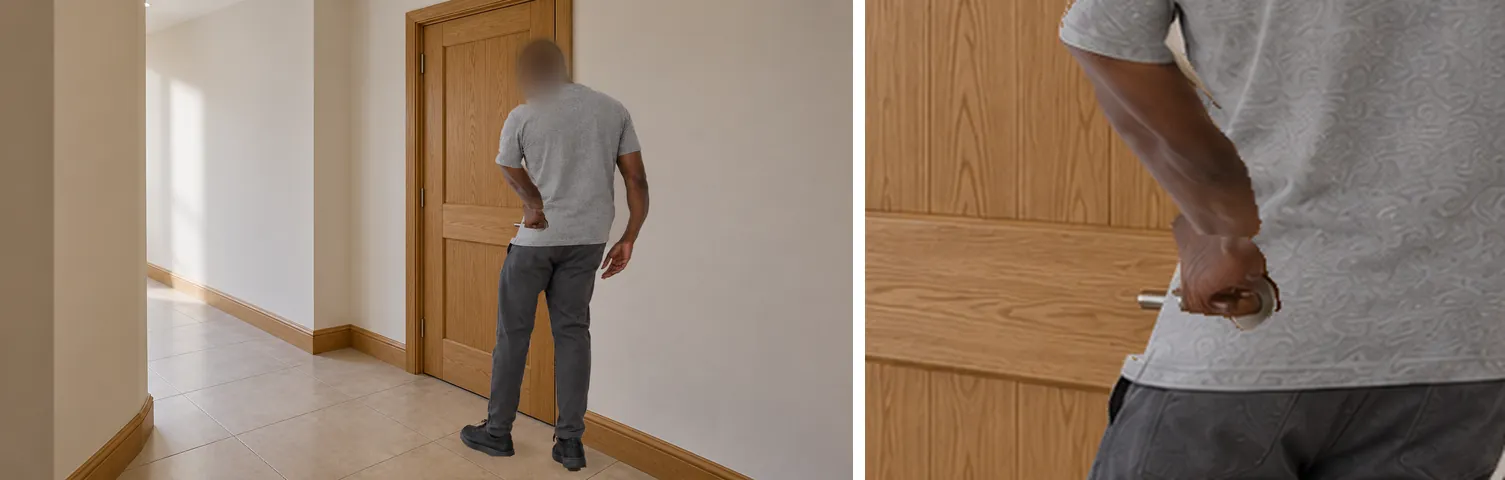
I asked why it had missed it. Its answer: “I used image input and viewed R04 repeatedly. My review still failed.” By its own account, it had checked small patches of the image for changes but had not properly checked the hand’s outline, wrist or fingers, and its own manual editing, done to fix my standing position, had introduced or worsened the damage. Even after agreeing the image was defective, it proposed using it as the start frame for a paid video test. I had to stop it: “But R04 is the bad image bro?”
The lesson applies well beyond my project. An AI agent saying “done” on visual work isn’t a quality check. Someone still has to look closely at every frame.
More detail didn’t buy more control
After each failure I pushed for more explicit instructions. Which hand. Which way to turn. Where the eyes go. The prompts grew into a 12-step action script. The glass was placed 40 cm left of the sink and 15 cm back from the counter edge, and the camera positions were given in metres. As I said at the time, we went “from a very simple prompt to a very extensive, detailed one that even still failed.”
More words aren’t automatically better, either. Runway’s prompting guide says its model “thrives on prompt simplicity”. It warns that dictating every second with many actions “may provide unintended results.” Both things are true at once. A short prompt leaves every physical detail for the model to guess, and it guesses differently every time. A long prompt states those details, but the model doesn’t reliably follow all of them together.
The tools added friction of their own:
- Clip length. I chose Flow’s cheapest option, five four-second clips, and four seconds turned out to be too short for this much action. By the assistant’s own account, the edit then sped four of them up by about a third to fit 15 seconds. My verdict on the result: “looks awful.”
- Mixing controls. According to the assistant, Higgsfield rejected a fixed start frame combined with reference images, so the Grok clip ran with neither end of the clip locked.
- Feature limits. Google’s documentation shows its Veo 3.1 Quality model doesn’t accept reference images at all, which ruled out the reference-guided rerun the assistant had planned with it.
- Automation. A lot of what first looked like failed video generation was actually the browser automation tool connecting the assistant to Google Flow. It timed out picking images and opening download menus. As I said at the time, “I don’t know if I would say we had a video generation error, since most of that was the MCP.” By then I had already asked for it to be uninstalled.
Possible, but not with a simple prompt
I said it plainly during the project: “it is not that it is not possible, but that simple prompts do not get you there. You need to define everything to even get close to something usable.”
Researchers have shown it can be done with the right process. GenHSI produces long videos of a consistent person interacting with a scene by working the way a film studio does. It writes a script that breaks the task into small actions, blocks out the scene in 3D, and only then animates. That’s a production pipeline, not a prompt. And every stage still needs someone who can look at a frame and see that the door opens the wrong way.
Where this leaves me
I’m not claiming AI image and video tools don’t work. They do things that were out of reach a few years ago, and I’ll keep using them.
The difference is supervision. When I ask an AI for an article or a block of code, I review it the way I’d review a colleague’s draft. When I asked for a man to drink a glass of water, I had to check every face, hand, hinge and frame myself, and I was still the one catching the errors. Researchers and working creators are reporting the same gaps. Text generation can mostly run on light review now. Video generation still needs a human watching closely.
About this test: this was one real production attempt, not a controlled benchmark. Some of the still images I fed into the video models still had flaws, and part of the trouble came from the automation tool rather than the models. I’ve kept those separate from what the models themselves produced. Outside sources checked 12 October 2026.